WhatsApp Bulk Messaging
Sep 3, 2026How to Create Broadcast in WhatsApp: Android and iPhone

Learn how to send bulk WhatsApp messages without getting banned, volume limits, ban triggers, and safe sending practices for Indian businesses.

Kartik Patel
Head of Delivery
Contents
Contact us
Overview: Sending bulk WhatsApp messages without getting banned comes down to three things: a clean contact list, message relevance, and controlled send volume. WhatsApp does not ban accounts for using bulk sending tools. It bans accounts for behavioural patterns, spam reports from unrecognised senders, sudden volume spikes, and identical messages sent to people who never asked to hear from you. This guide covers everything you need to know about how to send bulk messages on WhatsApp safely, how to build and segment your list, how to set up and schedule campaigns, what volume limits to stay within, and the opt-in and best practices that keep your number safe long-term.
Bulk WhatsApp messaging gets accounts banned when it is done without understanding what WhatsApp actually monitors. This guide covers the full process safely from building and segmenting your contact list to running your first campaign, using a free WhatsApp bulk message sender tool that works from your browser with no download and no saved contacts required. You will also learn the specific behaviours that trigger bans, the volume ranges that keep accounts safe, and the opt-in practices that protect your number long-term.
Bulk messaging on WhatsApp means sending the same message (or a personalised variation) to multiple contacts in one send action, outside of a standard group chat. This includes WhatsApp's native broadcast list, the WhatsApp Business App's broadcast feature, and browser-based tools that run through your existing WhatsApp Web session. Understanding these methods is the first step toward sending bulk WhatsApp messages without getting banned.
WhatsApp distinguishes between two sending methods. The official Business API requires Meta approval, a verified business account, and pre-approved message templates before any message goes out. Browser-based tools like Roklo operate through your existing WhatsApp number directly, without an API integration or template approval process. The two are structurally different, and the rules that apply to each are different too.
What they share: both methods are subject to WhatsApp's spam detection, which reads the behavioural patterns of your account, not just the tool you are using.
The ban risk is not about the tool. It is about how the tool is used.
Also Read: Best WhatsApp Marketing Tool in 2026
There are three practical options for bulk sending on WhatsApp. Understanding the difference matters before choosing a method, because each comes with different limits, requirements, and risk profiles.
Available in the personal WhatsApp app. You can add up to 256 contacts per broadcast list. Recipients must have your number saved in their phone, otherwise the message does not deliver. There is no scheduling, no analytics, and no interval management. For occasional sends to a small known audience, it works. For anything beyond that, the 256-contact cap and the saved-number requirement become blockers quickly.
Adds a layer of business features: quick replies, business profile, labels for contact organisation. The broadcast limit remains 256. Recipients still need your number saved. There is no send scheduling and no delivery tracking beyond the basic read receipts in the app.
Operates through your existing WhatsApp Web session. No download, no API approval, no template pre-registration. You import contacts via Excel or sync from your WhatsApp directly, build targeted groups, create message templates, and run campaigns with scheduling built in. Recipients do not need to have your number saved. Roklo's anti-ban engine manages the send intervals automatically between messages.
| Features | WhatsApp Broadcast List | WhatsApp Business App | Roklo (Browser-Based) |
| Contact limit per send | 256 (contacts must have your number saved) | 256 (broadcast list) | No hard limit per campaign |
| Contacts need to save your number | Yes | Yes | No |
| Download or install required | No | Yes (mobile app) | No |
| Scheduling | No | No | Yes |
| Message activity tracking | No | Limited | Yes |
| Anti-ban interval management | No | No | Yes (built-in) |
| Cost | Free | Free | Free |
In short: For occasional sends under 256 contacts: the broadcast list works. For structured campaigns, scheduling, and no saved-number requirement: a browser-based tool is the practical path.
WhatsApp's spam detection is behavioural. It monitors patterns across your account, not whether you are using a specific tool. The signals it watches for:
Rule: Never send to a purchased or unverified contact list. Contacts who do not recognise your number are the fastest path to spam reports, and spam reports are the fastest path to a ban.
Roklo's anti-ban engine spaces messages automatically to mimic natural usage patterns rather than machine-speed sends. This addresses the volume-and-velocity trigger. The triggers it cannot address for you are list quality and message relevance. Those remain the sender's responsibility.
In short: Clean list + relevant message + controlled send rate = low ban risk. All three matter. Remove any one and the risk increases significantly.
Opt-in means the recipient has explicitly agreed to receive WhatsApp messages from you. It is the single most effective protection against spam reports, because a contact who opted in expects your messages and is unlikely to report them.
Opt-in does not require a formal process. It can be as simple as:
What opt-in is not
A phone number collected at an event, purchased from a list provider, or scraped from a directory. These contacts have not consented to hear from you on WhatsApp, and messaging them is both a ban risk and a poor conversion strategy.
Opt-in is not a WhatsApp API requirement for browser-based tools. But the underlying logic is the same regardless of method: a contact who did not consent to your messages is a contact who will report them. Opt-in is a ban-prevention practice, not just a compliance formality.
Also Read: WhatsApp Message for Event Invitation: 17 Templates and How to Send in Bulk
The process below uses Roklo to send bulk messages on WhatsApp without saving contacts individually, without downloading software, and without API approval.
Open Roklo in your browser. Click "Sync your WA" in the bottom-left corner. This imports your existing WhatsApp contacts — everyone already in your phone — directly into Roklo's contact manager. You can also import a contact list from an Excel file using the "Import Excel" button in the top-right corner of the Contacts dashboard.
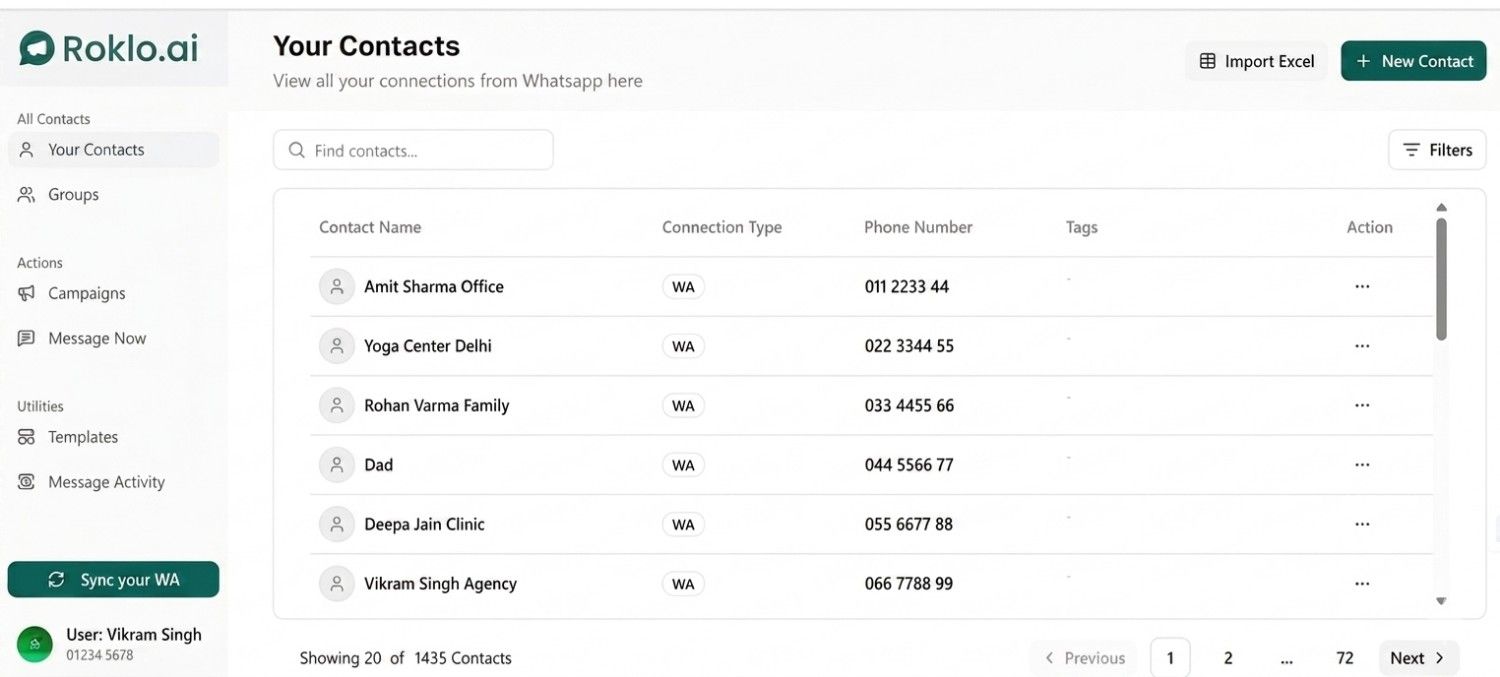
Roklo Contacts Dashboard — sync from WhatsApp or import via Excel
Result: Your full contact list is visible in Roklo with name, connection type, phone number, and tags. Search, filter, and segment from here.
Go to "Groups" in the left sidebar. Create targeted groups based on your audience: clients by city, leads by stage, patients by appointment type, students by batch. Segmentation is one of the strongest protections against spam reports because it keeps messages relevant to the recipient.
Contacts can be assigned to multiple groups. When creating a campaign, you select the group, not individual contacts, which keeps targeting consistent across sends.
Best practice
Segment before you send. A relevant message to 200 targeted contacts performs better and gets flagged less than a generic message to 2,000.
Go to "Templates" in the left sidebar. Build your message here before creating a campaign. Templates keep messaging consistent and save time across repeat sends.
Write clearly. Keep the message directly relevant to the recipient's context. For existing clients, reference something specific to your relationship: their name, their last interaction, or their appointment. Personalisation significantly reduces the chance of a spam report.
Roklo's template system supports formatted text, attachments, and images. The live preview shows exactly how the message will appear on WhatsApp before it goes out.
Roklo offers two sending modes depending on your timeline.
Campaign mode (via "Campaigns" in the sidebar): For scheduled, structured sends to a defined audience. Set the campaign name, select your template, choose your target contacts or group, and pick a send date and time. Recommended for planned outreach: announcements, event reminders, follow-up sequences.
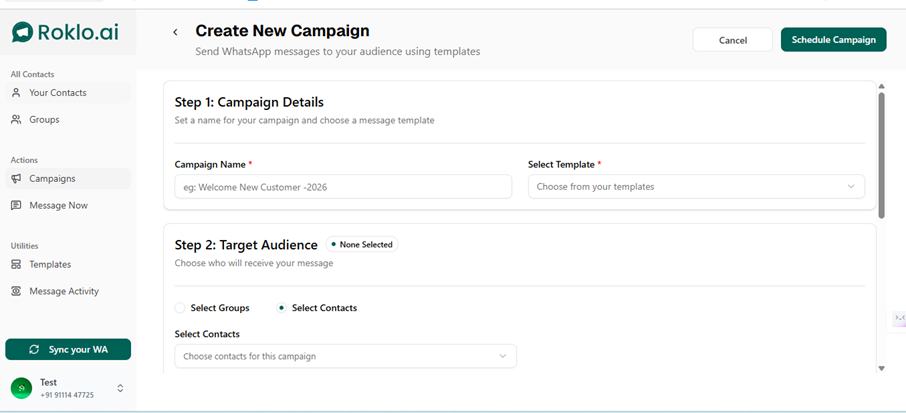
Create New Campaign - set campaign name, select template, choose target audience
Quick Send mode (via "Message Now" in the sidebar): For immediate sends without creating a named campaign. Select recipients, compose or choose a template, preview in real-time, and send. Use this for time-sensitive updates where scheduling is not practical.
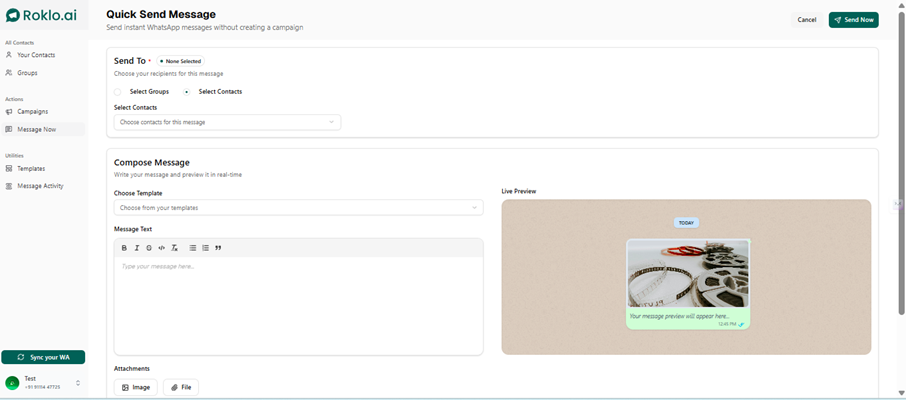
Quick Send - compose message and preview in real-time before sending
In Campaign mode, Step 3 of the campaign creation flow handles scheduling. Choose "Schedule for Later", pick your send date and time, and Roklo manages delivery at the specified time.
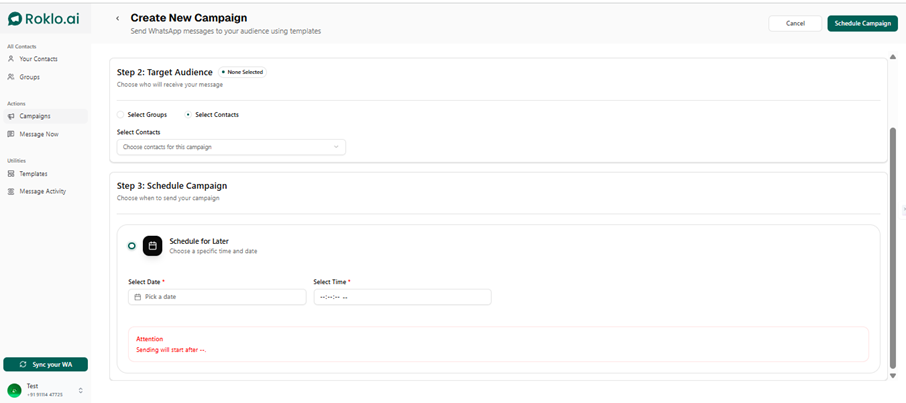
Campaign scheduling — set your send date and time, Roklo handles delivery
For Quick Send, click "Send Now" when ready. Roklo's anti-ban engine spaces the messages automatically. You do not manage intervals manually.
Result: Your campaign delivers to your selected audience, spaced to WhatsApp's safe usage patterns, with no manual copy-pasting required.
In short: Five steps: sync contacts, segment into groups, prepare a template, choose campaign or quick send, schedule and go. The anti-ban engine handles message spacing throughout.
Volume is one of the most common reasons why sending bulk WhatsApp messages without getting banned becomes difficult. But the number itself is rarely the trigger — it is the sudden jump. WhatsApp's spam detection watches how fast your send rate changes, not just how many messages you send on any given day.
| Account History | Recommended Daily Volume | Guidance |
| New number (under 1 month) | 50 to 100 messages/day | Start low. Build a consistent history before scaling. |
| Established (1 to 6 months) | 200 to 500 messages/day | Increase volume in weekly steps, not daily jumps. |
| Active (6+ months) | 500 to 1,000 messages/day | Maintain consistent daily patterns. Avoid sudden spikes. |
These are behavioural guidelines based on observed account patterns, not published WhatsApp limits. The principle behind them: an account that goes from 10 messages/day to 800 messages/day overnight is far more likely to be flagged than one that reaches 800 through a gradual four-week ramp-up.
Account warm-up
If you are starting bulk sends for the first time on a number, begin at 50 to 100 messages per day for the first two weeks. Increase by 50 to 100 messages per week after that. Consistent daily sends at a lower volume build a safer pattern history than occasional high-volume blasts.
Timing also affects delivery and report rates. Messages sent between 9am and 7pm in the recipient's time zone have lower ignore and block rates than late-night sends. This is not a hard WhatsApp rule, but it is a pattern that affects perceived relevance and therefore spam report likelihood.
Also Read: How to Schedule Messages on WhatsApp: Complete Guide for 2026
These practices protect your WhatsApp account regardless of which sending method you use to send bulk messages on WhatsApp. They address the behavioural signals that WhatsApp's detection systems actually monitor.
Existing clients, opted-in leads, and registered students are safe recipients. Purchased lists, scraped numbers, and anyone with no prior relationship with your business are not. One spam report from an unrecognised sender carries more weight than a dozen clean sends.
A message the recipient finds useful will not be reported. A message that feels like unsolicited advertising will be. Before every campaign, ask: does this contact have a reason to expect this message from me?
Roklo handles message-level spacing. Campaign-level spacing is your responsibility. Do not send daily. Even a highly engaged audience will start ignoring, or reporting, messages if the frequency is too high. Two to three sends per week is a reasonable ceiling for most business types.
Messages addressed by name, or referencing something specific to the recipient's context, generate lower report rates than generic broadcasts. Use them wherever your contact data allows.
Check Message Activity in Roklo after each send. A drop in delivery rates or a rise in non-delivery signals may indicate your account is being throttled. If you see this pattern, reduce volume and pause sending for 48 hours before resuming at a lower rate.
Include a line in your message that makes it easy to stop receiving messages: "Reply STOP to unsubscribe" or similar. A contact who opts out is one less potential spam report. This is a simple practice that pays back in account longevity.
The goal is not to send as many messages as possible. It is to send the right messages to the right people at the right frequency — and keep sending indefinitely.
Sending bulk WhatsApp messages without getting banned is not about finding the right workaround. It is about understanding what WhatsApp actually monitors and building your sending behaviour around it. A clean, opted-in contact list eliminates the biggest ban trigger before you even hit send. Controlled volume ramp-up protects your account history. Relevant, well-timed messages keep your recipients from reporting you.
The method you use matters less than the discipline you bring to it. The businesses that send bulk WhatsApp messages without getting banned long-term are not the ones with the most contacts. They are the ones with the most disciplined sending habits.
If you want to run ongoing campaigns without tracking intervals manually or managing contact lists by hand, Roklo handles the full flow from your browser: contacts, groups, templates, campaign scheduling, and message activity tracking, with an anti-ban engine built in. It is free to use as a free bulk message sender - open your browser, sync your contacts, and your first campaign is live in minutes.
Head of Delivery
Kartik Patel is the Head of Delivery at Roklo, specializing in scaling AI solutions and leading high-performing engineering teams to deliver impactful digital transformations.